


Virtual tours and CRM tools are changing how real estate works.
- 87% of buyers expect virtual tours before visiting a property in person.
- Listings with virtual tours get 40% more clicks and sell 31% faster at higher prices.
- Combining virtual tours with CRM systems boosts lead management and conversion rates, with some teams achieving 7–9% conversions (compared to the 1–3.5% average).
This article breaks down three plans – Basic, Professional, and Enterprise – each designed for different business needs. From solo agents to large brokerages, these tools help streamline operations, track leads, and improve sales outcomes.
1. Basic Plan
Integration Depth
Basic plans rely on manual integration, often requiring users to copy embed codes into MLS fields or websites. Free CRMs like Zoho and HubSpot offer built-in tools that integrate smoothly, though they limit customization with third-party platforms. Most basic plans also support standard URL uploads to popular portals like Zillow and Realtor.com, ensuring your virtual tours are visible where buyers are already searching.
Platforms like CloudPano ($15–$30/month) and Kuula ($10–$20/month) provide unlimited hosting but require manual updates for each listing. This setup works well for agents managing a small number of listings each month. These basic integration options form the foundation for the more advanced features offered in higher-tier plans.
Lead Generation Features
Basic plans often include lead capture forms and interactive hotspots, allowing inquiries to flow directly through the tour interface. You can also add expandable digital business cards and embed contact information to keep your branding front and center. Some platforms even let you gate premium features – like 3D dollhouse views or property measurements – behind an email registration form, helping you identify serious buyers while filtering out casual browsers.
The results speak for themselves: listings with 3D tours receive 87% more views than those with just photos and generate 41% more inquiries on Zillow.
"Virtual tours pre-qualify buyers better than any phone screening ever could".
Basic analytics tools track engagement, such as which rooms draw the most attention, giving you actionable insights to fine-tune your marketing strategy.
Scalability
Basic plans are ideal for solo agents or small teams but often come with limits on the number of active tours or users, which can restrict growth. For instance, platforms like RealtyJuggler may fall short for agencies looking to expand. To avoid outgrowing your tools too quickly, consider platforms with tiered pricing models that allow you to start small and scale up as your business grows.
Automation Capabilities
Automation features in basic plans are straightforward, offering tools like task reminders, mobile notifications, and basic lead capture forms. More advanced automation, such as AI-driven follow-ups or predictive lead scoring, is typically reserved for higher-tier plans. For agents just starting to integrate virtual tours with CRM tracking, these basic tools provide a simple yet effective way to manage leads without overwhelming complexity.
Free CRMs like HubSpot and Zoho include enough automation to help you manage leads from virtual tours, offering features like contact logs and simple task tracking.
"A system that’s easy to use can boost your productivity".
These foundational automation tools are a great starting point for lead management and pave the way for adopting more advanced solutions as your needs grow.
2. Professional Plan
Integration Depth
Professional plans take integration to the next level with two-way data synchronization. They pull property details from your database, push tour links directly to client records, and even generate MLS-compatible embed codes for platforms like Zillow and Redfin. This seamless setup ensures your CRM is always up-to-date with engagement data, giving you the tools to prioritize follow-ups effectively.
These advanced integrations not only streamline workflows but also enhance how you capture and analyze leads.
Lead Generation Features
With professional plans, lead generation gets smarter. Premium content – like 3D dollhouse views and accurate measurement tools – is gated behind email capture, ensuring you filter out casual browsers and focus on high-intent prospects.
White-labeling is another standout feature. By replacing third-party branding with your own logo and contact details, you reinforce your brand’s authority while still tracking every lead. Combine this with CRM analytics, and you can score leads based on metrics like time spent exploring specific rooms or revisiting certain listings. Considering that 87% of buyers now expect virtual tours before scheduling in-person showings, these tools allow you to engage prospects at the exact moment their interest peaks.
Scalability
Professional plans are designed for agents and teams managing 3 to 8+ listings per month, making them a solid investment as your business grows. The platform supports multi-team workflows and department management, so you can scale without needing to switch systems. High volumes of leads, contracts, and transactions are handled smoothly through integrations with MLS databases and ERP platforms like NetSuite.
For luxury properties priced over $500,000, consider investing in top-tier Matterport scans ($150/month, $4,000 camera). For standard listings, more cost-effective options can help you balance quality and budget as your portfolio expands.
Automation Capabilities
Automation in professional plans goes beyond basic reminders. Imagine this: when a prospect spends over 12 minutes on a virtual tour, automated email and SMS sequences are triggered. Tasks are generated, and AI-driven scoring identifies the leads most likely to convert.
With professional CRMs averaging around $117 per user per month, the time saved and improved conversion rates make the expense worthwhile. Start small by automating repetitive tasks like follow-up emails, then gradually adopt more advanced tools like predictive scoring systems. These features free up your time and ensure you’re focusing on the leads that matter most.
Matterport VR and Zoho CRM Integration – Extension – Google Inside Streetview 2022

sbb-itb-2f9da9d
3. Enterprise Plan
The enterprise plan builds upon the features of basic and professional plans, offering a higher level of integration and automation tailored for large-scale operations.
Integration Depth
Enterprise plans provide complete API access and seamless integration with platforms like Salesforce and Propertybase. This ensures that virtual tour data is automatically synced with CRM records, eliminating the need for manual input. These systems also connect effortlessly with MLS services using IDX and RETS standards. For instance, when a prospect engages with a 3D tour, metrics such as time spent in specific rooms are directly fed into your CRM. This level of connectivity sets the stage for advanced automation and lead generation tools.
Lead Generation Features
Enterprise solutions make it possible to control access to premium features. For example, you can require email registration before prospects can view advanced tools like 3D dollhouse views or measurement features. Adding pre-qualification steps – such as mortgage approval questions or agent representation status – ensures that only serious buyers gain full access to tours. This approach not only improves lead quality but also helps accelerate closing times.
Scalability
For brokerages handling eight or more listings per month, enterprise platforms like Matterport Marketing Cloud offer a centralized solution for managing property media. These cloud-based systems support unlimited agents and listings, ensuring consistent quality across all properties. They also reduce per-listing costs by allowing the use of in-house equipment, such as the Matterport Pro3 camera, which costs around $4,000. As operations grow, these platforms simplify management and support automated workflows, which will be discussed next.
Automation Capabilities
Automation in enterprise plans goes beyond basic scheduled emails. AI-driven lead scoring evaluates prospects based on their engagement during tours, prioritizing high-value leads for your best agents. For example, if a prospect spends 15 minutes examining a luxury kitchen, the system can trigger personalized follow-ups that include neighborhood details or comparable sales data. Automation tools also enable instant responses, such as launching SMS or email campaigns the moment a prospect interacts with a tour. These capabilities help high-performing teams achieve conversion rates of 7–9%, far exceeding the industry average of 1–3.5%.
Pros and Cons
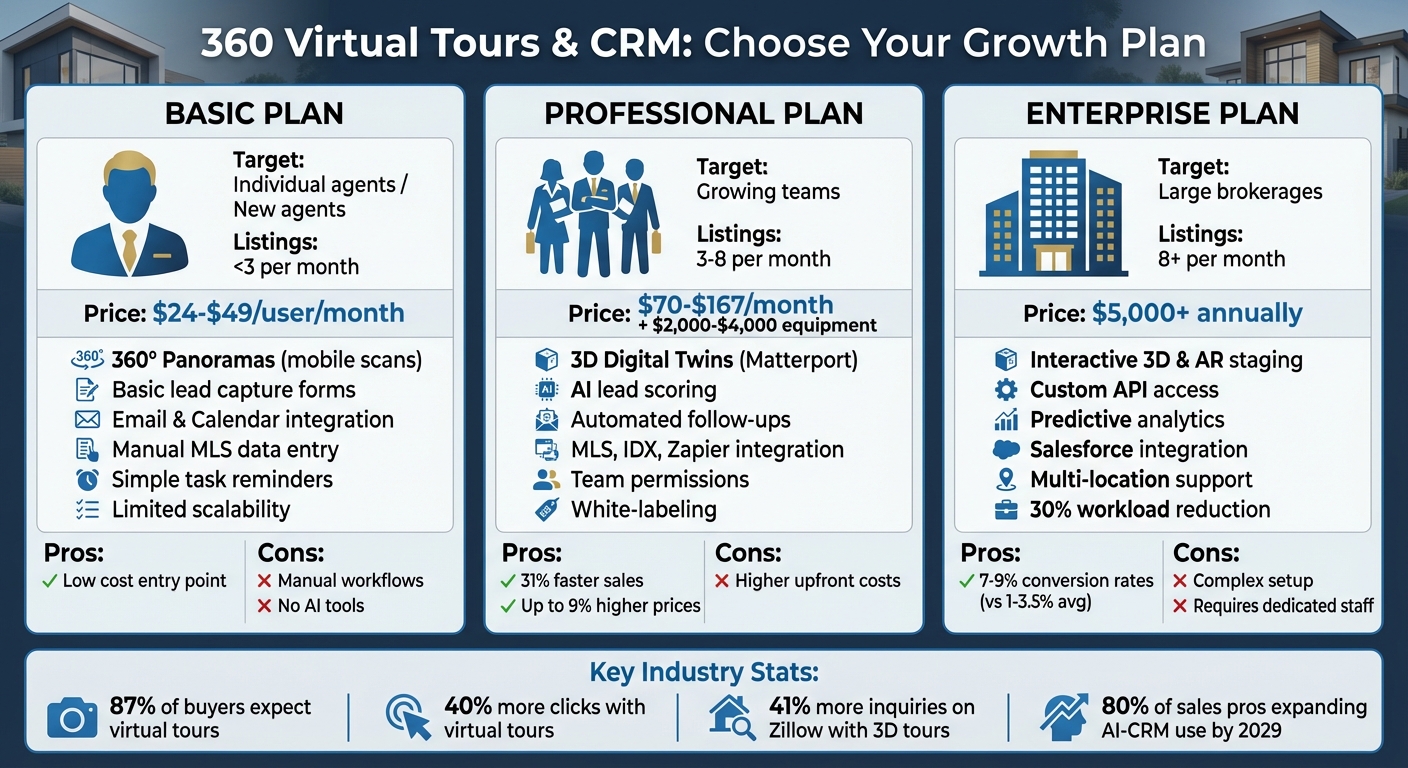
Real Estate CRM Plans Comparison: Basic vs Professional vs Enterprise
Breaking down the strengths and weaknesses of each plan helps illustrate how combining 360 virtual tours with a CRM can drive growth in real estate.
Each plan is designed to meet the needs of businesses at different stages. The Basic Plan is a cost-effective option, typically priced between $24 and $49 per user per month, making it a great fit for solo agents managing fewer than three listings a month. However, it comes with limitations: you’ll work with 360° panoramas instead of full 3D tours, and tasks like entering MLS data and managing leads will need to be done manually, as advanced tools like lead scoring aren’t included.
The Professional Plan is tailored for growing teams handling three to eight listings each month. It offers access to high-quality 3D digital twins, automated follow-up sequences, and AI-driven lead scoring that identifies high-intent prospects based on how they interact with your virtual tours. While this plan delivers more advanced features, it also comes with higher costs, ranging from $70 to $167 per month, plus equipment expenses of $2,000 to $4,000 for tools like the Matterport Pro3. The investment can pay off, as properties marketed through this plan tend to sell for up to 9% more and close 31% faster.
For large brokerages managing eight or more listings per month, the Enterprise Plan provides the most robust features, including deep integrations, custom API access, and predictive analytics to optimize conversion rates. It also automates repetitive tasks, reducing workload by about 30%. However, the plan’s complexity and cost are notable drawbacks. Annual fees can exceed $5,000, and onboarding and ongoing management often require dedicated staff.
| Feature | Basic Plan | Professional Plan | Enterprise Plan |
|---|---|---|---|
| Target Audience | Individual agents / New agents | Growing teams (3–8 listings/mo) | Large brokerages (8+ listings/mo) |
| Integration Depth | Basic (Email, Calendar) | Moderate (MLS, IDX, Zapier) | Deep (Accounting, Custom API, Salesforce) |
| AI Capabilities | Minimal or none | Lead scoring & auto-tagging | Predictive analytics & sentiment analysis |
| Automation | Manual or simple triggers | Automated follow-ups | Custom multi-stage workflows |
| Scalability | Limited to single users | Team-level permissions | Multi-location / Large team support |
| Virtual Tour Tech | 360° Panoramas / Mobile scans | 3D Digital Twins (Matterport Pro) | Interactive 3D & AR Staging |
This comparison highlights which plan aligns best with your business size, integration needs, and automation goals.
As RealOffice360 puts it:
"The gulf between average agents and top-producing agents is how you utilize your CRM analytics".
Selecting the right plan ultimately comes down to aligning your listing volume and budget with the features that will have the biggest impact on lead quality and conversion success.
Conclusion
Selecting the right mix of 360° virtual tours and CRM tools depends on aligning your current business needs with your future goals. If you’re a solo agent managing fewer than three listings per month, the Basic Plan provides a solid starting point. With 360° panoramas and basic lead capture, it equips you with the tools to establish a digital presence and start building momentum.
For growing teams handling three to eight listings monthly, the Professional Plan takes things up a notch. It adds interactive 3D elements, automated follow-ups, and AI-driven lead scoring. This means your team can focus on high-priority leads identified through tour interactions, saving time and energy. Plus, properties with enhanced virtual tours tend to sell for up to 9% more and close 31% faster, offering a clear return on investment.
For large brokerages managing eight or more listings each month, the Enterprise Plan is tailored to meet high-volume demands. It includes advanced features like custom API access, predictive analytics, and multi-location support. These tools streamline operations, cutting down manual tasks by as much as 30%, while providing the depth and scalability needed for larger portfolios.
As the real estate industry moves further into data-driven strategies – 80% of sales professionals plan to expand their use of AI-CRM tools within the next five years – investing in a plan that fits your current needs while preparing for future growth is key. Growth-Realty’s tiered plans ensure you’re equipped with the right tools today and a clear path to scale as your business evolves.
FAQs
How can 360 virtual tours boost real estate sales and improve lead management?
360 virtual tours have revolutionized the way properties are presented in the real estate market. These immersive, interactive experiences let potential buyers explore homes from the comfort of their own space, anytime they want. This means fewer in-person visits, saving valuable time for both buyers and agents. Plus, in a competitive market, properties with virtual tours tend to grab more attention and sell faster.
But the benefits don’t stop at showcasing homes. Virtual tours also open doors to a broader audience, including buyers from out of state or even abroad. They can boost a listing’s online visibility, drawing in more traffic and generating stronger leads. By merging convenience, engagement, and the ability to reach more people, 360 virtual tours have become a must-have tool for real estate professionals looking to grow their business.
What are the key differences between Basic, Professional, and Enterprise plans for virtual tours and CRM integration?
When it comes to choosing between Basic, Professional, and Enterprise plans for virtual tours and CRM integration, the article doesn’t dive into the specifics of what each plan offers. To make the right choice for your real estate business, consider evaluating key aspects like the range of features provided, how well the plan can scale with your needs, and its ability to integrate seamlessly with your existing systems. Taking the time to assess these factors can help you find the plan that aligns best with your goals.
How does CRM automation improve efficiency in real estate?
CRM automation is a game-changer for real estate professionals, simplifying repetitive tasks and enhancing client engagement. With automation, agents can handle follow-ups, schedule appointments, and update contact information effortlessly, freeing up valuable time to focus on closing deals and building lasting client relationships.
It also minimizes mistakes, ensures prompt responses, and maintains consistent communication. Features like automated email campaigns and personalized messages keep agents connected with their clients, helping to build trust and stronger relationships. By streamlining workflows and boosting client satisfaction, CRM automation becomes an essential tool for thriving in the highly competitive real estate industry.

