


Geo-targeted advertising in real estate is all about focusing your ad spend on specific areas – like neighborhoods or zip codes – to attract the right buyers and sellers. Measuring ROI (Return on Investment) for these campaigns is critical because real estate has a long sales cycle, typically 4–6 months, and every dollar counts. Here’s what you need to know:
- Why It Matters: Over half (52%) of homebuyers start their search online, often looking in specific areas. Geo ads allow you to target these buyers effectively, ensuring your budget isn’t wasted.
- Steps to Measure ROI:
- Set up campaign tracking with tools like UTM parameters, CRMs, and call tracking software.
- Define target areas (e.g., zip codes, neighborhoods) and tailor ad content to local audiences.
- Track key metrics like Cost Per Closed Transaction, Lead-to-Sale Conversion Rate, and Pipeline Velocity.
- Use the ROI formula: ROI = [(Revenue – Cost) / Cost] × 100.
- Analyze and adjust campaigns based on performance data, reallocating budgets to high-performing areas.
For example, if you spend $1,000 on ads targeting a specific zip code and earn $3,000 in commission, your ROI is 200%. Tools like Google Ads, CRM integrations, and A/B testing can help fine-tune your campaigns for better results.
Key Takeaway: Focus on conversions and revenue metrics instead of vanity metrics like clicks. Proper tracking and analysis ensure your ad spend delivers measurable returns.
Why Most Agents Fail At Geo Farming And How You Can Win!
Step 1: Set Up Campaign Tracking
Before you allocate any budget to geo-targeted ads, it’s essential to know exactly where your leads are coming from. Without proper tracking, you’re essentially flying blind. Take the case of a real estate investor who poured $5,000 into self-managed Google Ads over several months but didn’t set up tracking. The result? No visibility into what was working. Once conversion tracking was implemented and wasteful keywords were identified, they closed several deals in just four months, pocketing over $30,000 in profits.
Tracking isn’t just a nice-to-have – it’s the backbone of understanding your return on investment (ROI). To take it a step further, link your CRM with your ad platforms to ensure you’re capturing all the essential data.
Connect Your CRM to Ad Platforms
To measure ROI accurately, your CRM needs to work seamlessly with your ad platforms. Start by adding UTM parameters to every ad URL. These parameters help you track the source, medium, campaign, keyword, and even ad variation. For instance, if you’re running a Facebook ad targeting luxury homes in Miami’s 33131 zip code, your URL might look something like this:
utm_source=facebook&utm_medium=cpc&utm_campaign=spring_listings_miami&utm_term=luxury_homes_33131&utm_content=video_tour_01.
Make sure your lead forms capture UTM parameters automatically using hidden fields. This way, your CRM records exactly which campaign brought in each lead. For phone inquiries, use tools like CallRail (starting at $45/month) to assign unique tracking numbers to each geographic campaign. This allows you to attribute offline calls to the right ad.
To close the loop, enable Enhanced Conversions in Google Ads. This feature lets you upload offline conversion data – like closed home sales – using hashed first-party data. Since real estate leads often take 4–6 months to convert, this step ensures you’re connecting the dots between the initial ad click and your eventual commission.
Define Your Target Areas
Once tracking is in place, it’s time to define your geographic focus. Ad platforms give you the flexibility to target by zip code, neighborhood, city, or even a specific radius. For example, you could set a 5-mile radius around a high-value luxury listing. Use Google Ads’ "Matched locations" reports to confirm that your ads are appearing in the right areas.
To boost conversions, direct users to landing pages tailored to their location. A page that reflects their specific search area feels more relevant and increases the likelihood of engagement. Adjust your bids to prioritize high-performing regions while excluding areas that generate clicks but fail to convert. For your best-performing cities or zip codes, create dedicated campaigns with custom ad copy and specific budget allocations.
With your tracking tools and target areas locked in, you’re ready to dive into the metrics that truly drive revenue.
Step 2: Identify Key Metrics to Track
Once you’ve established reliable tracking, your next move should be analyzing the metrics that truly influence your revenue. The goal is to zero in on the numbers that matter most to your bottom line.
Track Metrics That Drive Revenue
Start by focusing on metrics that directly impact your commission earnings. One crucial metric is Cost Per Closed Transaction, which tells you how much you’re spending to secure each deal. For instance, if you invest $2,000 in ads targeting a specific zip code and close a deal with a $15,000 commission, your return becomes clear. Combine this with Revenue Attribution by Location using UTM parameters to pinpoint which neighborhoods or cities are bringing in actual income – not just clicks.
Another key metric is Pipeline Velocity, which measures how long it takes leads in different areas to convert. On average, real estate leads take 4 to 6 months to close. Adjust your budget based on how quickly leads convert in each area. Additionally, track the Lead-to-Sale Conversion Rate for each location. While typical rates range from 1% to 3%, some high-performing areas can hit conversion rates of up to 4%.
"If you don’t know where you’re spending your money, and what the return on that investment is, you’re not really running a business, you’re just guessing."
- Chris Speicher, Co-owner, The Speicher Group
Avoid getting overly fixated on achieving a low Cost Per Lead (CPL). The average CPL stands at $116, but what matters more is lead quality and conversion potential. Paying slightly more for higher-quality leads that result in closed deals is often a smarter investment.
After identifying these revenue-driving metrics, shift your focus to what truly matters: conversions.
Focus on Conversions, Not Just Traffic
While tracking revenue metrics, prioritize converting high-quality leads over merely boosting traffic. Metrics like clicks and visits may look impressive, but they don’t pay the bills. A campaign that generates 500 clicks but zero closings is far less effective than one with fewer clicks that turn into signed contracts.
Aim for a website conversion rate of at least 2%, though well-optimized sites can achieve rates as high as 10%. The ultimate benchmark, however, is your Lead-to-Sale Conversion Rate. This is especially relevant since real estate buyers typically interact with six or more touchpoints before making a decision.
"If you’re not constantly tracking lead sources all the way through to the end, you can’t find out what’s actually working."
- Carolyn Thompson, Managing Broker, Keller Williams Realty
Step 3: Calculate ROI with Real Estate Examples
Real Estate Geo Ad ROI Comparison Across Zip Codes
Once you’ve nailed down your key metrics, the next step is figuring out your ROI. This will help you pinpoint where your advertising dollars are making the biggest impact.
The ROI Formula for Geo Campaigns
The formula for ROI is simple:
ROI = [(Revenue – Cost) / Cost] × 100.
In this equation:
- Revenue refers to the gross commission income (GCI) from deals generated by your campaign.
- Total Campaign Cost includes ad spend, management fees (which usually range from $1,500 to $10,000 per month), and expenses for CRM or analytics tools.
For example, if you spend $1,000 on ads and earn $3,000 in commission, your ROI is 200%. That means you’re making $2 for every dollar you invest. Real estate investor Brian Rockwell highlights how valuable such returns can be.
Keep in mind that real estate deals often have a conversion cycle of 4–6 months. To get a clearer picture of performance, calculate your ROI over a 12-month period. Buyers typically interact with your campaign about six times before making a decision. These calculations are crucial for evaluating and comparing how different areas perform.
Example: Comparing ROI Across Zip Codes
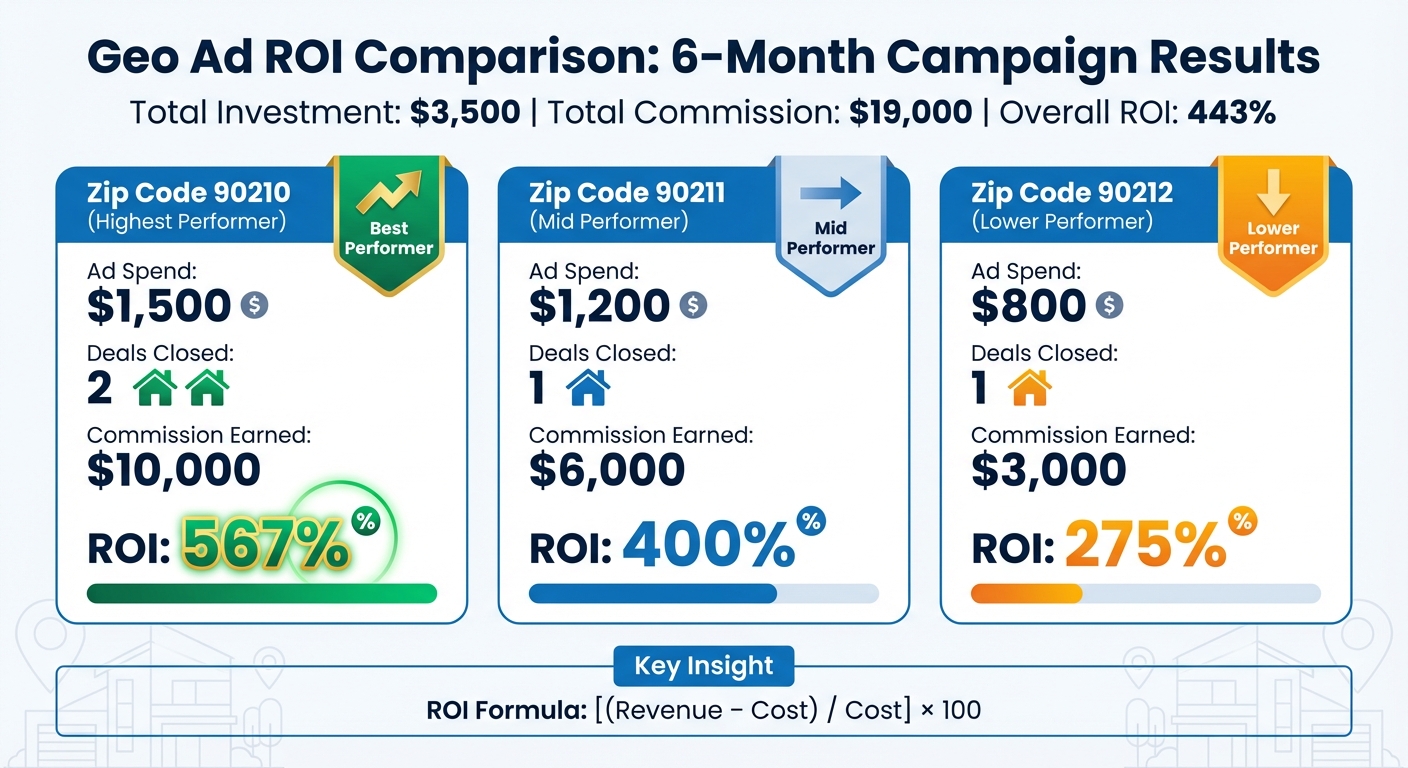
Let’s break this down with a real-world example. Imagine running a geo-targeted campaign with a total budget of $3,500 across three zip codes over six months. The campaign results in four closed deals, generating $19,000 in commission. Here’s a detailed look at how ROI compares across the zip codes:
| Zip Code | Ad Spend | Deals Closed | Commission Earned | ROI |
|---|---|---|---|---|
| 90210 | $1,500 | 2 | $10,000 | 567% |
| 90211 | $1,200 | 1 | $6,000 | 400% |
| 90212 | $800 | 1 | $3,000 | 275% |
| Total | $3,500 | 4 | $19,000 | 443% |
From the table, it’s clear that Zip Code 90210 stands out with a 567% ROI, while Zip Code 90212 trails behind at 275%. This type of analysis helps you decide where to focus your budget. For example, in competitive markets like Dallas, Texas, investors might spend anywhere from $1,000 to $5,000 just to close a single deal. That’s why understanding ROI by area is so important for staying profitable.
sbb-itb-2f9da9d
Step 4: Analyze and Improve Campaign Performance
Once you’ve calculated your ROI, the next step is to focus on refining your campaign’s performance. This involves digging into your data to pinpoint what’s working well and identifying areas that need tweaking. By making these adjustments, you can fine-tune every aspect of your geo-targeted strategy, ensuring your efforts are as effective as possible.
Use A/B Testing to Pinpoint Success
A/B testing is a powerful way to figure out which elements of your ads are driving better results. The key is to test one variable at a time – whether it’s the headline, image, or call-to-action. For instance, you could run two ad variations in the same zip code: one offering a "Free Home Valuation" and another with the message "See What Your Home Is Worth Today." Then, compare results like lead quality and cost efficiency.
Don’t wait months for final sales data to gauge success. Instead, focus on early indicators such as click-through rate (CTR) and cost per click (CPC). These metrics quickly show whether your message is resonating with your local audience. If you notice a high bounce rate on your landing page in certain neighborhoods, it could mean the content isn’t hitting the mark, or the page might be too slow to load. Keep in mind that even a 1-second delay in load time can reduce conversions by 7%. Use these insights to adjust your approach and allocate your budget more effectively.
Reallocate Budget to High-Performing Areas
Your data analysis will highlight which geographic areas are delivering the best results. Shift your budget accordingly – reduce bids in underperforming regions and increase spending in areas with higher intent and better returns. Keep an eye on your impression share in each region. If it’s low in certain areas, it might mean your ads aren’t showing up often enough, possibly due to low quality scores or insufficient bids. Regularly reviewing key metrics will help you stay on top of campaign performance and adapt your strategy as new data comes in.
Step 5: Use Tools for Geo Ad Analytics
Integrate CRM and Analytics Platforms
Connecting your CRM with ad platforms is a game-changer for tracking the entire customer journey. This setup allows you to monitor offline conversions, like in-person showings or finalized deals, even if they occur months after someone clicks on your ad. It ensures you’re capturing every step of the process – from the first click to the final closing.
One key strategy is recording each lead’s Google Click ID (GCLID) in your CRM. This unique code ties a prospect back to the specific ad and geographic area that initially grabbed their attention. Pair this with UTM parameters on landing pages to track traffic sources, campaign performance, and mediums. For instance, if a lead from your "Luxury Homes Miami" campaign eventually converts, you’ll know precisely which ad variation and location made it happen.
"If you don’t know where you’re spending your money, and what the return on that investment is, you’re not really running a business, you’re just guessing." – Chris Speicher, Co-owner, The Speicher Group
Call tracking software is another must-have. It allows you to link phone leads to specific ads and neighborhoods, giving you a clearer picture of what’s working. These integrations lay the groundwork for advanced tools, like those offered by Growth-Realty.
Growth-Realty‘s AI-Powered Solutions

Growth-Realty takes geo-targeted campaigns to the next level with its AI-powered platform. By combining call tracking, CRM systems, and automated SEO listing pages, the platform streamlines lead generation and campaign management. Its AI-driven lead qualification system ensures incoming leads are sorted quickly, while conversational AI chatbots engage prospects right away – an edge that’s vital in competitive, high-stakes markets.
The platform also integrates with MLS systems across more than 650 markets through its CT IDX Pro+ feature. This automatically generates SEO-friendly listing pages, boosting ad relevance and quality scores. Add in automated home valuation landing pages, and you’ve got tailored entry points for each geographic campaign. These tools make it simple to identify which neighborhoods are delivering the best results. With real-time data insights, you can adjust budgets on the fly to focus on high-performing areas, ensuring your geo-targeted ad spend works harder for you.
Conclusion
Measuring ROI for geo-targeted real estate ads involves connecting every dollar spent to the commissions earned. To get started, ensure your CRM is set up for accurate tracking, define key metrics (focusing on conversions rather than vanity metrics), and use the ROI formula to compare performance across various zip codes and neighborhoods. Regular analysis and A/B testing will help pinpoint what’s working, allowing you to shift your budget from underperforming areas to locations delivering higher ROI.
This process is especially important because of the delays inherent in real estate transactions. The long sales cycle makes continuous tracking essential. For example, a sale that closes in December might stem from an ad click in June. Without proper attribution, it’s impossible to determine which geographic campaigns are generating real revenue.
"If you don’t know where you’re spending your money, and what the return on that investment is, you’re not really running a business, you’re just guessing." – Chris Speicher, Co-owner, The Speicher Group
To account for these delays, calculate ROI over a 12-month period. Use objective data points – like a Cost Per Lead (CPL) averaging $116 and conversion rates ranging from 1–3% – to guide your strategy. By leveraging these insights, you can make informed decisions and strategically reallocate your ad spend for better results.
FAQs
How can I track and measure leads from geo-targeted ads in real estate?
To effectively track and assess leads from geo-targeted ads in real estate, start with tools like Google Ads conversion tracking and UTM parameters. These tools allow you to pinpoint which ads are driving potential clients to your business. By setting up conversion tracking, you can directly link ad interactions to actual leads, offering a clear view of how well your campaigns are performing.
Take it a step further by integrating your ad data with a CRM system. This integration lets you monitor leads from their first interaction all the way through to closed sales, making it easier to tie conversions back to specific geo-targeted campaigns. Keep an eye on key metrics such as click-through rates, cost per lead, and conversion rates. Use this data to fine-tune your targeting, keywords, and landing pages. Regular analysis and adjustments can help you attract higher-quality leads and get the most out of your ad spend.
What key metrics should I track to measure ROI for geo-targeted real estate ads?
To evaluate the ROI of geo-targeted real estate ads, keep an eye on these important metrics:
- Conversion Rate: This tracks the percentage of people who view your ad and then take a specific action, like filling out a form or booking a property showing. A strong conversion rate means your message is connecting with your audience.
- Cost Per Lead (CPL): This tells you how much you’re spending to generate each lead. It’s a crucial indicator of how efficiently you’re using your advertising budget.
- Return on Ad Spend (ROAS): ROAS measures how much revenue your ads are bringing in compared to what you spend. For instance, if you invest $500 in ads and earn $2,000 in revenue, your ROAS is 4x.
By monitoring these metrics, you can clearly see how well your campaign is performing and make informed adjustments to improve your results.
How can I boost the ROI of my geo-targeted ad campaigns in real estate?
To get the most out of your geo-targeted ad campaigns in real estate, focus on sharp tracking and ongoing fine-tuning. Keep an eye on key metrics like cost per lead (CPL), lead-to-sale conversion rate, and return on ad spend (ROAS). These numbers will show you which areas and strategies are driving the best results. By linking tools like Google Ads conversion tracking with your CRM, you can track leads from the first click all the way to closing. This gives you clear, actionable insights to improve your campaigns.
Leverage geographic performance data to allocate your budget where it counts – neighborhoods or regions delivering the strongest returns. Adjust your targeting, keywords, and landing pages regularly to align with performance trends. For an extra edge, consider advanced tools like AI-driven lead generation or virtual tours from platforms like Growth-Realty. These features can make your ads more engaging and customized for local audiences, boosting your chances of connecting with top-tier leads and driving conversions.

