


When CRM and marketing automation work together, your business runs smoother. Here’s why:
- Unified Data: Sales and marketing teams share one accurate source of information, eliminating silos.
- Automated Processes: Tasks like lead scoring, follow-ups, and data entry happen automatically, saving time.
- Personalized Experiences: Tailored emails and targeted campaigns engage leads more effectively.
- Better Insights: Track every step of the customer journey and measure campaign ROI accurately.
- Improved Results: Businesses see a $5.44 ROI for every $1 spent on these tools, with higher lead conversions and faster deal closures.
This integration simplifies workflows, reduces manual work, and helps teams focus on what matters – closing deals and building relationships. Ready to see how it works? Let’s dive in.
Integrating CRM and Marketing Automation: Unifying Data for a Complete Customer View
Benefits of Connecting CRM and Marketing Automation
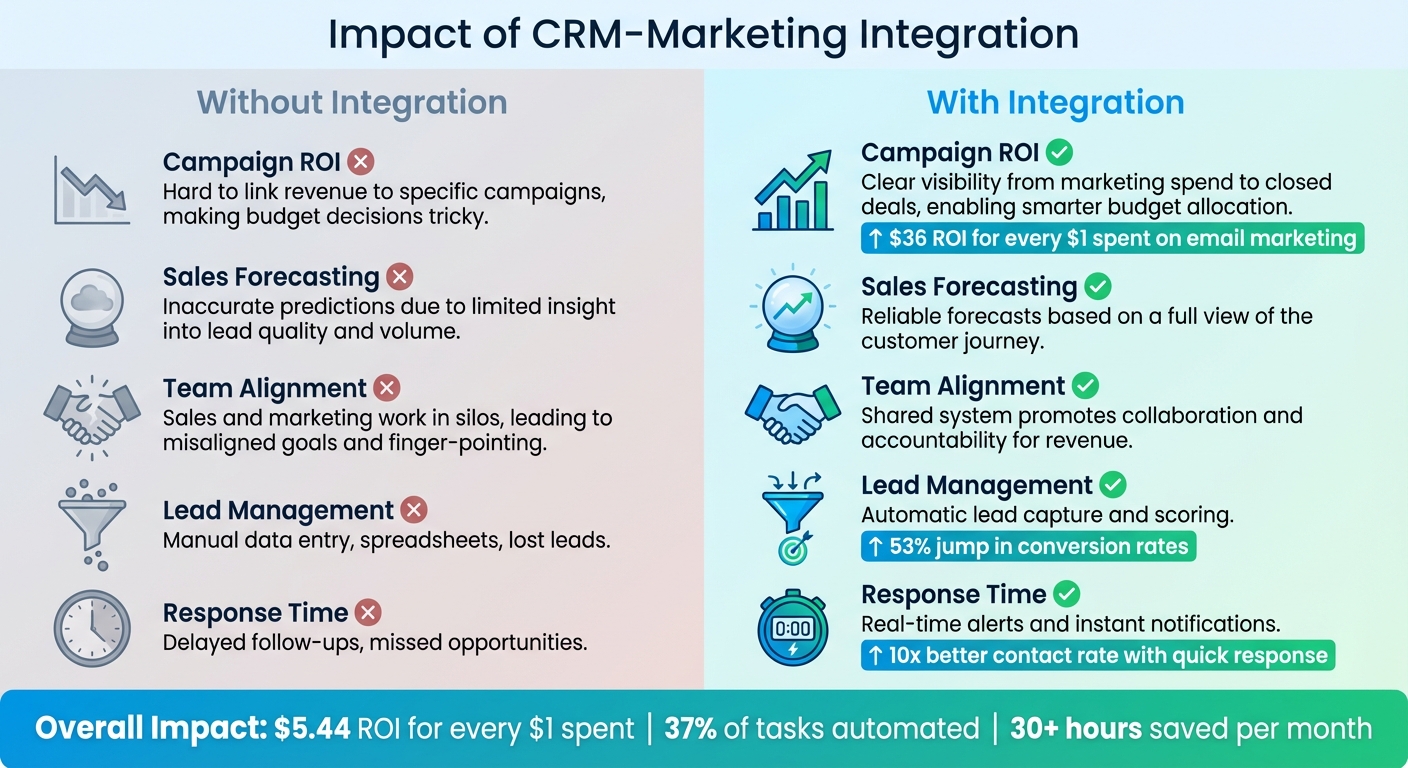
CRM-Marketing Integration: Before vs After Comparison
Automated Lead Management
Integrating CRM with marketing automation takes the hassle out of manual data entry. Imagine this: someone fills out a form on your IDX website or shoots you a message on social media. Instantly, their details sync with your CRM, building a complete contact profile without you lifting a finger. Forget spreadsheets, endless copy-pasting, or worse – losing track of potential leads.
Here’s where it gets even better: the system scores leads automatically based on their behavior. For example, if someone keeps checking out the same property listing, their score goes up. Once their score hits the "Sales Ready" mark, the CRM steps in, creating a task, assigning it to an agent, and firing off an alert via email or Slack. This kind of quick response can make a massive difference – boosting the chances of making contact by 10x and improving qualification rates by 6x.
Automation doesn’t just stop there. It ensures every lead gets immediate attention, even when you’re juggling a million other tasks. Did you know that roughly 37% of tasks can be automated? That translates to saving agents over 30 hours every month. Plus, businesses using automation see a 53% jump in conversion rates, with automated nurturing turning up to 20% of leads into clients.
And it’s not just about efficiency – it’s also about creating better connections with clients.
Better Client Personalization
When your CRM and marketing automation work together, they create a unified customer profile. This profile pulls in everything – contact history, property preferences, email interactions, and website activity. Let’s say a lead is browsing for condos in a specific zip code or checking out waterfront homes. The system picks up on this and sends out personalized emails automatically.
What makes these emails stand out? They come from the agent’s personal account, not some generic address, creating a sense of a one-on-one conversation. Agents can also see exactly which properties a lead has viewed, letting them tailor their approach. Whether it’s offering tips for first-time buyers or sharing an in-depth market analysis for experienced investors, the system segments leads based on their stage in the buying journey. And here’s a key stat: 87% of customers expect personalized interactions, and companies report that targeted campaigns deliver the most value.
Once you’ve nailed personalization, the next step is making smarter decisions with better data.
Better Data and Reporting
When your CRM and marketing automation tools are connected, you get access to closed-loop reporting. This means you can track every deal from the first interaction to the final handshake. No more guessing which marketing efforts are actually driving revenue. Instead, you can analyze performance across channels and align your marketing spend with what’s working.
Here’s a quick breakdown of how integration solves common challenges:
| Area | Without Integration | With Integration |
|---|---|---|
| Campaign ROI | Hard to link revenue to specific campaigns, making budget decisions tricky. | Clear visibility from marketing spend to closed deals, enabling smarter budget allocation. |
| Sales Forecasting | Inaccurate predictions due to limited insight into lead quality and volume. | Reliable forecasts based on a full view of the customer journey. |
| Team Alignment | Sales and marketing often work in silos, leading to misaligned goals and finger-pointing. | A shared system promotes collaboration and accountability for revenue. |
Integration also delivers real-time insights. For example, if a lead requests a home valuation or repeatedly visits a listing, the system immediately notifies the agent. This unified view doesn’t just help agents – it empowers leadership to make better sales forecasts by identifying lead quality and volume early on. And when it comes to email marketing, leveraging CRM data can yield an average ROI of $36 for every $1 spent. With both teams working from the same playbook, decisions become more aligned and impactful.
Core Features to Look for in an Integrated System
When selecting a system, aim for one that does more than just store contacts. The ideal platform captures leads, nurtures them automatically, and syncs effortlessly with your existing tools. Here’s a closer look at the features that make CRM and marketing integration truly effective.
Automatic Lead Capture and Scoring
Your system should seamlessly capture leads from various sources like IDX websites, landing pages, web forms, social media, and digital ads. For example, when someone fills out a form or saves a property search, their details should flow directly into your CRM – no manual data entry required.
But capturing leads is just the beginning. Behavioral lead scoring is what sets serious buyers apart from casual browsers. By tracking actions like repeated property views, saved searches, or opened emails, the system assigns points to each lead. Once a lead hits a certain score – say, 100 points – the CRM can automatically create a task, assign it to an agent, and send out an email alert. This is crucial because waiting even an hour to follow up with a new lead can make you 10 times less likely to connect with them. Real-time syncing ensures you’re reaching out while the lead is still engaged, which can boost conversion rates by up to 53%.
And it doesn’t stop there – automated marketing tools take engagement to the next level.
Marketing Automation Features
Look for systems capable of running multi-channel drip campaigns through email, SMS, and even direct mail to nurture leads over time. The best platforms also send personalized property alerts when new listings match a client’s saved search criteria or when there’s a price drop. This keeps you in front of potential buyers without requiring constant manual effort.
Smart lead routing is another must-have. Your system should automatically assign leads to agents based on factors like location, price range, or property type. Advanced platforms go a step further, using AI tools for tasks like automated call answering, call summaries, and re-engagement sequences to revive cold leads. These features free up agents to focus on what matters most – negotiations and showings.
In early 2025, Ryan Fitzgerald, owner of Raleigh Realty, introduced an automated email sequence that sent follow-up messages to leads at regular intervals after their initial inquiry. This allowed his agents to dedicate more time to negotiations and showings, leading to a 30% increase in lead conversion rates within just three months.
MLS and Social Media Connections
Integrations with MLS and social media platforms are key to creating a unified sales process.
IDX integration is essential for any CRM. A system that syncs with the Multiple Listing Service (MLS) transforms your website into a searchable engine that tracks user preferences. Real-time updates ensure new listings appear instantly while sold properties are removed without requiring manual input. Plus, each property gets indexed by search engines, improving your site’s visibility. Opt for native integration to minimize errors and ensure seamless syncing.
Social media integrations are just as important. Your CRM should capture leads directly from platforms like Facebook, Instagram, and LinkedIn, ensuring no inquiries slip through the cracks. Tools that repurpose website listings into social media posts and support automated retargeting ads help maintain a strong online presence while showcasing relevant properties to users who’ve visited your site. Features like dynamic number insertion in social bios or on yard signs can also help track which platform generates the most valuable leads. With 36% of Realtors in 2023 reporting that their highest-quality leads came from their CRM systems, these integrations are critical for staying competitive.
How to Integrate CRM and Marketing Platforms
Successfully integrating CRM and marketing platforms requires more than just connecting systems – it’s about aligning your strategy, teams, and data. While the technical setup might seem straightforward, the real effort comes from ensuring your teams are on the same page and clearly defining how data flows between the systems. This approach builds on the integrated workflows mentioned earlier.
Choose Tools and Set Goals
Start by assembling a cross-functional team that includes members from Marketing Ops, Sales Ops, and IT. Together, map out the customer journey and establish who owns which data at each stage. This team should document every interaction where data is captured and determine how that data will move between your CRM and marketing tools.
Decide on the "source of truth" for each type of data. For instance, sales and firmographic details like contact information and deal stages typically belong to the CRM, while behavioral data – such as email engagement and website activity – resides in your marketing platform. Determine whether you need a unidirectional sync (one-way flow to protect master data) or a bidirectional sync (two-way flow for fields like phone numbers and addresses). To keep your CRM clean, set up inclusion lists – rules that ensure only qualified, sales-ready leads are synced, preventing the system from being overwhelmed with unqualified records.
Once your goals and responsibilities are clear, focus on preparing your data for a smooth transfer.
Clean and Transfer Data
Before activating the integration, standardize key data fields. For example, ensure consistent picklist values for details like lead sources, property types, and geographic areas. Poor data quality can be expensive – on average, it costs businesses $12.9 million annually. To avoid this, deduplicate records using unique identifiers like email addresses and fix any formatting inconsistencies before they spread across systems.
Carefully map each data field between platforms. For instance, link a field like "Property Interest" in your marketing platform to a custom field in your CRM. Run a test in a controlled environment to confirm that your mappings are accurate before going live.
Test and Track Performance
Conduct User Acceptance Testing (UAT) with your sales and marketing teams. Simulate real-world scenarios to ensure data syncs correctly. For example, Instructure achieved 50% faster lead follow-up after integrating multiple platforms, showing the value of thorough testing.
Train your teams by demonstrating how the integration benefits them directly. For sales, highlight how it delivers better-qualified leads with more context. For marketing, show how it measures their contributions to revenue. Regularly monitor metrics like lead-to-opportunity rates, sales cycle times, and marketing-sourced revenue to track the integration’s success. Keep an eye on error logs and conduct annual data mapping audits to ensure the system evolves alongside your business. This ongoing effort ensures your integration delivers lasting results and supports continued growth.
sbb-itb-2f9da9d
Common Problems and How to Fix Them
Even with meticulous setup, integration hiccups can still pop up, disrupting your workflow. Tackling these issues quickly is key to keeping everything running smoothly. Here are some common challenges and how to address them effectively.
Data silos can trap contact information in isolated apps, leading to conflicting records. For example, one system might store a client’s personal email, while another has their work address. This inconsistency can cause confusion for your team and mess up reports. Similarly, duplicate records often arise when systems don’t use unique identifiers, making it hard for your sales team to trust their data. Sync loops are another headache, where two systems continuously update the same field, creating an endless cycle of changes.
Field mismatches are a frequent culprit behind sync failures. Imagine your CRM expects "United States", but your marketing platform sends "USA" instead – the sync breaks. API limits can also get maxed out when syncing thousands of unqualified leads, delaying essential updates. Finally, lacking a defined "source of truth" can result in one system overwriting valuable data from another.
To fix these problems, start with a thorough data cleanup. Deduplicate contacts using unique identifiers like email addresses, standardize picklist values across platforms, and remove invalid records before syncing. Decide which system will own specific data types – your CRM might handle sales and firmographic data, while your marketing platform manages engagement metrics. Use inclusion lists to sync only qualified leads, reducing API usage and keeping your CRM organized.
Problems and Solutions Table
| Common Problem | Root Cause | Recommended Fix |
|---|---|---|
| Duplicate Records | No unique identifiers or manual data entry in both systems | Use email addresses as unique identifiers |
| Sync Errors/Failures | Mismatched picklist values or CRM validation rules | Standardize picklist values; ensure integration user has full write permissions |
| Overwritten Data | Both systems trying to control the same field | Assign a "Source of Truth" for each field (e.g., CRM for Phone Number, Marketing for Lead Score) |
| API Limit Reached | Syncing too many unqualified leads | Create "Inclusion Lists" to sync only leads meeting criteria like MQL status |
| Stale/Outdated Data | Manual updates or infrequent sync schedules | Enable real-time, bidirectional syncing for critical fields |
| Sync Loops | Circular triggers causing endless updates | Assign one system as the master for specific objects and disable redundant triggers |
After implementing these fixes, test everything in a sandbox environment before going live. Set up automated alerts to catch sync failures or data mismatches early. Regularly review error logs and conduct annual audits of your integration settings to ensure your system adapts as your business evolves.
Growth-Realty‘s CRM Integration Solutions

Growth-Realty provides a streamlined CRM platform designed specifically for real estate professionals aiming to enhance their marketing and client management efforts. One standout feature is its AI-powered lead scoring, which analyzes client behavior to predict the likelihood of closing deals. For example, if a potential buyer repeatedly views a listing or saves a specific search, the system flags them as high-intent, prompting timely follow-ups.
The platform doesn’t stop there – it simplifies marketing with tools like social media syncing. With just one click, agents can set up Facebook and Google ads, automatically directing leads into the CRM system. To make retargeting even easier, built-in ad portals allow agents to manage campaigns without switching between platforms. Additionally, the CRM integrates MLS data feeds from external agents and collaborators, consolidating all listings into a single, easy-to-manage view.
Communication tools are another major highlight. The CRM includes WhatsApp chatbots that qualify leads 24/7, while a live chat feature engages website visitors in real time. All WhatsApp conversations and chatbot logs are stored in one place, creating a comprehensive interaction history. Agents can instantly share property details through WhatsApp, Facebook, or Twitter, ensuring quick and seamless communication.
Another powerful tool is the AI-driven lead matching feature, which captures buyer preferences and quickly identifies suitable properties. Agents can then email detailed property information immediately. A dedicated lead module tracks every step of the buyer’s journey, from initial contact to closing, and even generates property flyers with automated watermarking in PDF or image formats.
The platform’s interactive dashboard provides real-time insights into website performance and visitor behavior, helping agents fine-tune their marketing strategies on the go. The results speak for themselves: real estate agencies using this integrated CRM report up to 41% higher revenue per agent and close deals 30% faster. Plus, with an estimated 37% of real estate tasks becoming automatable by 2025, agents could save over 30 hours per month by cutting down on repetitive tasks.
Conclusion
Bringing your CRM and marketing automation together creates a unified system that eliminates data silos and ensures your team works in sync. When sales and marketing rely on the same data, you avoid duplicate efforts, inconsistent messaging, and missed opportunities. In fact, integrated systems can increase lead conversions by 53% and provide measurable ROI.
For real estate professionals, the benefits are even more tangible. By automating tasks like follow-up emails, appointment scheduling, and data entry, agents can save over 30 hours every month. Agencies have reported up to 41% higher revenue per agent and deals closing 30% faster. Plus, the importance of speed can’t be overstated – delaying a response by just one hour can reduce an agent’s chances of making contact tenfold.
Growth-Realty’s CRM platform takes these efficiencies even further. With features such as AI-powered lead scoring, automated social media syncing, WhatsApp chatbots, and real-time dashboards, the platform centralizes everything a real estate professional needs. From MLS feeds and client communications to social media campaigns, it’s all in one system designed specifically for the real estate industry.
FAQs
How does integrating CRM with marketing automation boost lead conversion rates?
Integrating CRM with marketing automation can significantly improve lead conversion rates by delivering a more seamless and personalized customer experience. These systems work hand-in-hand to automatically monitor and respond to lead actions, such as browsing a website or engaging with an email. This ensures timely and relevant follow-ups while cutting down on manual work, so agents can concentrate on closing deals without missing any potential leads.
This integration also equips sales teams with valuable insights into marketing efforts, enabling more precise and impactful communication. By automating workflows and keeping customer profiles updated, real estate professionals can respond swiftly and accurately to buyer needs, boosting the likelihood of turning leads into loyal clients.
What features should a CRM-marketing integration have for real estate professionals?
When selecting a CRM-marketing integration for real estate, focus on features that make managing leads easier, automate repetitive tasks, and keep your data in sync across platforms. For example, automated lead capture from sources like your website or social media can save you hours by pulling in potential clients instantly. Pair that with tools for follow-up emails and reminders, and you’ll have a system that keeps you on top of your leads without breaking a sweat.
Look for integrations that support multi-channel marketing – email, social media, and digital ads – so you can deliver a consistent experience no matter where your clients interact with you. Features like tracking client behavior, such as page views or inquiries, can help you tailor your outreach, making it more relevant and effective. And don’t underestimate the value of integrations with tools like IDX websites, virtual tours, or chatbots, which not only improve your workflow but also enhance how clients engage with your services.
With the right features in place, you’ll streamline your processes, improve communication, and position yourself for steady business growth.
How does integrating CRM with marketing tools improve client personalization?
Integrating CRM systems with marketing tools allows real estate professionals to create highly personalized experiences for their clients by merging detailed data from various platforms. This approach provides a clearer understanding of client preferences, behaviors, and interactions, which helps agents craft more targeted communication and marketing strategies. For example, follow-ups can be automated based on specific client actions, like viewing a property listing or clicking on an email, ensuring that every outreach feels timely and relevant.
When data from multiple channels – such as email, social media, and websites – is synced, it creates a seamless and consistent experience for clients. This opens the door to personalized property suggestions, tailored messages, and more meaningful interactions. The result? Stronger client relationships, higher engagement, and better chances of closing deals.

