


Keeping your CRM pipeline organized and accurate is essential for driving revenue and avoiding inefficiencies. Here’s what you need to know:
- Data Accuracy Matters: CRM data decays by up to 35% annually, leading to missed opportunities and inaccurate forecasts.
- Key Practices:
- Schedule regular data audits to clean up outdated or duplicate records.
- Use automation to handle repetitive tasks like lead routing and follow-ups.
- Customize pipeline stages to match your sales process for better visibility.
- Implement lead scoring to prioritize high-quality leads.
- Monitor key metrics like sales velocity and pipeline value to spot bottlenecks.
- Train your team regularly to ensure consistent CRM usage.
- Benefits: Companies with strong pipeline management see 15% higher growth rates, improved sales efficiency, and better forecasting.
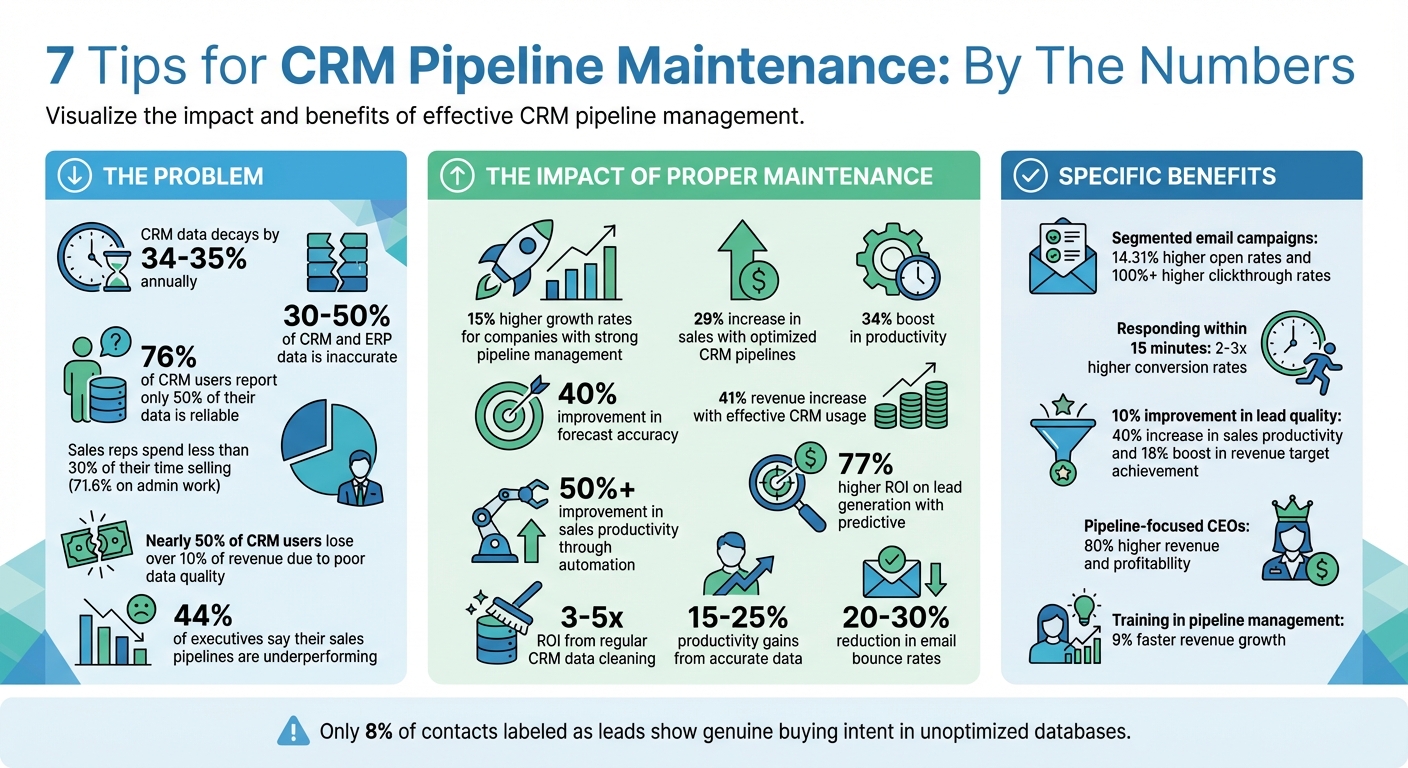
CRM Pipeline Maintenance: Key Statistics and Impact Metrics
Sales Pipeline Management (Best Practices)
1. Schedule Regular Data Audits and Cleanups
CRM data doesn’t stay pristine forever. Contacts change jobs, companies merge, and emails go stale. In fact, data decays at a rate of about 34% annually. That means nearly a third of your CRM data could become unreliable every year if left unchecked.
To keep your data accurate and useful, schedule regular audits – whether monthly, quarterly, or yearly – depending on how much data you’re managing.
Actionable Steps to Take
Start with a solid foundation by setting up governance rules before diving into cleanup. For instance, establish "survivorship rules" to determine which record to keep when merging duplicates – like prioritizing the one with the most recent update. Standardize naming conventions for things like job titles and industries to avoid inconsistencies (e.g., "CA" vs. "California"). Assign a dedicated data owner, such as a CRM manager, to ensure someone is accountable for maintaining data quality.
Use your CRM’s built-in tools or third-party solutions to identify and merge duplicate records. Remove hard bounces, unsubscribed contacts, and any entries that don’t align with your target market. To stop bad data at the source, enforce mandatory fields and dropdown menus during data entry. Clean data not only streamlines operations but also directly impacts your bottom line.
Why It Matters for Your Pipeline
Clean data is more than just a housekeeping task – it protects your revenue. Nearly half of CRM users report losing over 10% of revenue due to poor data quality. With accurate data, your team can focus on selling rather than untangling messy records. Plus, better data means better marketing results – segmented email campaigns, for example, see 14.31% higher open rates and over 100% higher clickthrough rates.
When your New York sales rep and your London marketer are working with the same up-to-date, real-time data, the entire organization operates more smoothly.
"Data hygiene isn’t a one-time task – it’s an ongoing discipline that should be baked into your operations and company culture." – Clevyr, Inc
2. Update Client Records and Remove Duplicates
Duplicate records can wreak havoc on your sales efforts. When your database is cluttered with conflicting information, automated emails risk landing in the wrong inboxes. Studies suggest that 30% to 50% of CRM and ERP data is inaccurate, which means your pipeline metrics might not be as reliable as you think. Cleaning up these records lays the groundwork for better automation and stronger lead management.
Actionability of the Tip
Regularly auditing and updating client records is key to keeping your pipeline accurate. Most CRMs offer deduplication tools – use them. Enforce validation rules at the point of entry to stop duplicates before they happen. When duplicates do surface, merge them to preserve the complete interaction history, so you don’t lose valuable context.
Another effective step? Segment dormant leads – those who’ve been inactive for six months. Run one last re-engagement campaign, and if they remain unresponsive, remove them. Standardizing database formatting also makes a big difference. Use consistent phone number formats, full company names, and uniform state abbreviations for a cleaner, more professional database.
Impact on Pipeline Efficiency
Keeping your records in order doesn’t just make life easier – it delivers real results. Regular CRM data cleaning can generate a 3-5x ROI by improving sales efficiency and boosting email deliverability rates. Accurate data can lead to productivity gains of 15-25% and reduce email bounce rates by 20-30%. This not only protects your sender reputation but also ensures your messages reach the right audience.
Accurate records are the backbone of effective lead nurturing. As Adelina Karpenkova from Artisan aptly puts it:
"Bad data undermines your credibility. Incorrectly starting a sales call with ‘So, are you still at [Company Name]?’ kills deals before they start."
When your data is up-to-date, your automated outreach feels more personal, and your pipeline reflects genuine opportunities.
Ease of Implementation
The first cleanup might feel like a heavy lift, but once you establish a routine, maintenance becomes far simpler. Many modern CRMs now use AI and machine learning to flag potential duplicates automatically[5, 17]. To stay on top of things, consider setting aside an hour each week for your team to review records or assign specific team members as data champions to oversee the process[1, 5].
And here’s a bonus: Since most CRM providers charge based on contact count, removing duplicates and inactive records can lower your software costs[9, 21]. Keeping your records accurate isn’t just about organization – it’s about turning your CRM into a tool that drives revenue.
3. Use Automation for Routine Tasks
Streamline your CRM pipeline by automating repetitive tasks, giving your team more time to focus on revenue-generating activities. Did you know sales reps spend less than 30% of their time selling? A staggering 71.6% of their time is consumed by manual administrative work. Automation takes care of these tedious tasks, allowing your team to concentrate on what really matters – selling.
Actionability of the Tip
Start with lead routing. When a new inquiry comes in, let your CRM automatically assign it to the right agent based on criteria like territory, property value, or expertise. For instance, a $6M beachfront property can go directly to your luxury specialist, while commercial inquiries are routed to the appropriate team member.
Next, implement automated follow-up sequences. For example, send an immediate thank-you message when someone submits a form. Responding within 15 minutes can increase conversion rates by 2–3x.
Will Featherstone, founder of Featherstone & Co., highlights the power of automation:
"The drip email has made a huge difference to [the] pipeline, keeping [the] service in front of the right eyes."
Another smart move is setting up stalled deal alerts. Configure your CRM to flag deals that haven’t progressed in over 10 days, ensuring timely follow-ups and preventing leads from going cold. You can also automate tasks like contract generation and eSignature requests once a deal reaches the "Contract Sent" stage, keeping the momentum going.
Impact on Pipeline Efficiency
Integrating automation into your daily CRM workflow can significantly boost efficiency. It’s not just about saving time – automation can improve sales productivity by over 50%. By eliminating manual data entry, you also enhance data accuracy, which is critical since 76% of CRM users report that only half of their data is reliable. Faster response times are another major benefit; engaging prospects quickly during their decision-making window is crucial, especially when the median first-response time for B2B teams is around 12 hours.
Patrick O’Leary from PMG360 sums it up perfectly:
"Most teams don’t have a lead problem. They have a system problem."
With routine tasks automated, your pipeline becomes a true reflection of real opportunities, not just a backlog of administrative chores.
Ease of Implementation
Modern CRMs make automation easy with pre-built workflows that don’t require coding. Begin with high-impact tasks like lead assignment and follow-up emails. Once those are running smoothly, expand to include appointment reminders, testimonial requests, and re-engagement campaigns. You can even connect your Google or Outlook calendar to automate scheduling, and use templates to auto-populate to-do lists when new prospects enter the system.
Before scaling automation, define clear lifecycle stages and lead scoring. As Patrick O’Leary advises:
"Automation only works when alignment exists. Otherwise, you’re just scaling confusion."
With a strong foundation in place, automation can become your most dependable team member – one that never misses a follow-up or forgets to update a record.
4. Customize Pipeline Stages to Match Your Workflow
Fine-tuning your CRM pipeline stages to reflect your sales process can make a world of difference in how effectively you manage deals. By moving beyond generic pipeline setups, you can create a system that mirrors your customer journey, reducing confusion and clutter while improving visibility.
Actionability of the Tip
Start by mapping out your customer journey – from the initial contact to the final deal closure. Identify the key milestones along the way and use those as your pipeline stages. Each stage should have clear exit criteria. For example, a lead might move into the "Qualified" stage only after you’ve confirmed their budget, timeline, and motivation. Without these criteria, unqualified leads can pile up in your pipeline, making it harder to forecast accurately.
Spencer Smith, Team Lead US Sales at Pipedrive, highlights the importance of structure in this process:
"A standardized sales process takes the guesswork out of selling and prevents you from inadvertently rushing prospects from one stage to the next."
While a seven-stage pipeline is often effective, consider limiting it to six stages per pipeline to keep things manageable. If your business serves different markets – like buyers versus sellers or residential versus commercial – create separate pipelines for each. This ensures your data stays organized and clear. To prevent delays, establish time limits for each stage. This tailored approach not only makes your pipeline easier to navigate but also boosts efficiency.
Impact on Pipeline Efficiency
Customizing your pipeline stages can turn your CRM into a powerful forecasting and decision-making tool. Clear, tailored stages improve visibility, leading to a 29% increase in sales, a 34% boost in productivity, and a 40% jump in forecast accuracy. For instance, if deals frequently stall at a specific stage or drop off after property showings, you can implement targeted objection-handling strategies. Given that real estate lead conversion averages just 2.4%, having this level of insight is incredibly valuable. Custom stages not only clarify where deals stand but also help you nurture leads more effectively.
Ease of Implementation
Modern CRMs often feature drag-and-drop tools, making customization quick and straightforward. Start by reviewing your current sales process to pinpoint where deals tend to stall or fall through. These problem areas will help you decide which stages need better definition.
Will Featherstone, Founder of Featherstone & Co., underscores the importance of tracking leads effectively:
"Getting leads as a source of business is one thing, but how you track and manage those leads is crucial and a major part of being a real estate agent."
sbb-itb-2f9da9d
5. Prioritize Leads Using Scoring and Segmentation
Actionability of the Tip
Focus on identifying and prioritizing high-quality leads. Lead scoring helps by assigning points based on two main factors: who the lead is (demographics like income or location) and what they do (behavioral actions like viewing properties or opening emails). A common approach is a 100-point scale, where you might allocate:
- 30% to financial capacity (e.g., +20 points for mortgage pre-approval),
- 25% to timeline urgency (e.g., +25 points for plans to list within 30 days),
- 25% to engagement (e.g., +15 points for requesting a Comparative Market Analysis).
Don’t forget negative scoring. For example, subtract -10 points for an unsubscribe or -7 for skipping a consultation. Establish clear thresholds for action:
- 80+ points: Make an immediate phone call.
- 60–80 points: Follow up within 48 hours.
- Below 40 points: Add to a long-term drip campaign.
This method keeps your lead pipeline focused and ensures your team spends time on the most promising opportunities.
Impact on Pipeline Efficiency
The benefits of lead scoring are hard to ignore. Even a modest 10% improvement in lead quality can increase sales productivity by up to 40% and boost revenue target achievement by 18%. Companies that adopt predictive lead prioritization systems report up to 77% higher ROI on lead generation efforts. Here’s why this matters: in many unoptimized databases, fewer than 8% of contacts labeled as "leads" show genuine buying intent. Scoring helps cut through the noise, highlighting true opportunities while automating follow-ups for colder prospects.
Ease of Implementation
The good news? Modern CRMs make it simple to put lead scoring into action. Many platforms have built-in scoring tools, and defining your point system is typically a one-time setup. A practical strategy is to adopt a three-tier intent model:
- High-intent actions (e.g., visiting pricing pages): +10 to +15 points.
- Medium-intent actions (e.g., attending a webinar): +6 to +9 points.
- Low-intent actions (e.g., reading a blog post): +2 to +4 points.
To take it a step further, configure your CRM to send instant mobile alerts when a lead hits 75 points. Why? Leads contacted within 5 minutes are 2–3 times more likely to convert than those contacted an hour later.
6. Monitor Pipeline Metrics and Performance Reports
Actionability of the Tip
Keeping an eye on key pipeline metrics like total deals, pipeline value, and average deal size gives you a clear picture of your operation’s scale. But the real game-changers are sales velocity metrics – win rates, average sales cycle length, and pipeline velocity. These metrics help identify the bottlenecks where deals tend to stall.
Take it a step further with weighted forecasting. Assign probability percentages to each stage of your pipeline (e.g., 10% for prospecting, 70% for negotiation) and set up automated alerts for prospects that have gone stale. This approach sharpens your revenue predictions. For a quick refresher, here’s the formula for Pipeline Velocity:
(Number of Deals × Average Deal Value × Win Rate) ÷ Sales Cycle Length.
Will Featherstone, founder of Featherstone & Co. in Baltimore, made the leap from spreadsheets to CRM tools to track "time to action" metrics. The result? His team consistently ranks among the top in Maryland/DC for both closed deal volume and total transaction value.
Impact on Pipeline Efficiency
Tracking these metrics isn’t just about crunching numbers – it’s about improving your pipeline’s overall efficiency. CEOs who focus on pipeline management see up to 80% higher revenue and profitability compared to their peers. Sales agents using CRM tools report a 29% increase in sales, a 34% boost in productivity, and a 40% improvement in forecast accuracy. Yet, despite these benefits, 44% of executives admit their sales pipelines are underperforming.
Regular monitoring helps you spot issues before they derail your deals. For example, between 2024 and 2026, Switzerland-based AI bees achieved an incredible 2,000% growth by adopting a custom CRM system. This setup unified lead tracking and automated reporting, freeing their team to focus on closing deals instead of getting bogged down in admin tasks. Keeping tabs on metrics is essential for building a CRM pipeline that drives consistent revenue growth.
Ease of Implementation
Modern CRMs make it easier than ever to put these strategies into practice. With built-in dashboards, you can wave goodbye to manual data entry and enjoy full pipeline visibility. Set automated alerts for deals that have stalled, standardize your pipeline stages (e.g., Prospecting, Qualification, Proposal, Negotiation, Closing), and schedule weekly performance reviews.
"A well-managed pipeline will provide you with clear insight into how well your sales process is working and where impactful improvements can be made."
- Spencer Smith, Team Lead US Sales, Pipedrive
Don’t just discard lost deals – record why they fell through. Whether it’s pricing, feature gaps, or another reason, this feedback loop helps you refine your approach and improve your win rates in the future.
7. Conduct Team Training and Usage Reviews
Why This Matters
Keeping your CRM in top shape starts with regular training and reviews. Begin with pilot programs to test new workflows and identify what works best for your team. Dedicate weekly "maintenance hours" where everyone focuses on updating accounts and cleaning up records. This ensures your data stays accurate and actionable.
Train your team to use dropdown menus instead of free-text fields – this simple step reduces typos and keeps data consistent. Schedule biweekly reviews to identify stalled deals and find solutions. To encourage participation, consider adding leaderboards that reward clean and well-maintained pipelines. These steps not only improve CRM usage but also boost overall efficiency.
The Effect on Your Pipeline
Proper CRM usage can make a huge difference. Research shows that companies using CRMs effectively can increase revenue by up to 41%. Training sales managers in pipeline management can help revenue grow 9% faster compared to companies that skip this step. However, poor CRM hygiene can be costly – 34% of sales leaders say it directly leads to lost revenue. Even more concerning, 76% of CRM users admit that only half of their organization’s data is accurate and complete.
"Most CRMs fail not because sales teams don’t care, but because they try to run before learning to walk. No amount of automation or dashboards can fix missing fundamentals." – Jenny Romanchuk, artisan.co
Regular training helps prevent bad habits, like reps only updating deals when someone is watching. When everyone follows the same rules for moving leads through the pipeline, you avoid the illusion of a "healthy" pipeline that’s actually full of unqualified prospects.
How to Make It Happen
While initial training takes time, modern tools can make this process smoother. Start by documenting standard operating procedures (SOPs) and creating cheat sheets for key tasks. Use in-app guidance and "Smart Tips" within your CRM to provide real-time help as your team works.
Set up a regular review schedule to keep things on track. For example:
- Conduct weekly system hygiene checks to catch data issues early.
- Hold biweekly one-on-one sessions to strategize around specific deals.
- Schedule monthly team reviews to address deals that are stuck.
Accountability is key. Use shared dashboards to set clear targets, like responding to hot leads within 15 minutes. This not only keeps your team aligned but also frees up more time for selling – something 50% of sales teams struggle to prioritize because they’re bogged down by data management. Training and regular reviews ensure your team spends less time wrestling with CRM tools and more time closing deals.
Conclusion
A well-maintained CRM pipeline is more than just a repository of contacts – it’s the engine that powers your growth. Without regular attention, though, it risks becoming a stagnant database where leads go to languish instead of progressing toward a sale. The seven strategies outlined in this article – from conducting regular data audits to investing in team training – are designed to keep your pipeline active and effective. These practical steps can lead to noticeable improvements in performance.
For instance, real estate agents who optimize their CRM pipelines report 29% higher sales, 34% greater productivity, and 40% better forecast accuracy. These results not only enhance day-to-day operations but also lay the foundation for consistent, predictable growth.
A well-maintained CRM isn’t just a tool – it becomes an extension of your business.
"A well-maintained CRM isn’t just a tool; it’s an extension of your business. Treat it like your most valuable assistant." – Realtor.com
The secret to achieving these results is consistency. By routinely auditing your system, automating repetitive tasks, and standardizing processes, you can ensure your CRM remains a competitive advantage. Keep in mind that 71% of buyers and 81% of sellers contact only one agent. This makes your response time and pipeline organization absolutely critical.
The right technology can make adopting these best practices much simpler. For example, Growth-Realty provides CRM solutions tailored for real estate professionals, offering AI-powered lead generation, automation, and marketing tools. By combining these best practices with Growth-Realty‘s specialized features, you can elevate how you manage leads, engage prospects, and close deals.
FAQs
How often should I review and clean my CRM pipeline data?
To maintain an accurate and efficient CRM pipeline, it’s wise to review and clean your data every three to six months. Regular audits help prevent outdated or incorrect information from disrupting your sales process or skewing important decisions.
If your business deals with a large number of leads or experiences frequent data updates, you might want to increase the frequency of these audits. Staying on top of your data ensures better lead prioritization, saves time, and keeps your CRM running smoothly.
What are the advantages of customizing CRM pipeline stages?
Customizing your CRM pipeline stages offers several important benefits. For starters, it allows sales teams to clearly track the progress of each lead or deal within the sales process. This clarity makes it much easier to spot bottlenecks and act quickly to keep things moving forward. Plus, by tailoring the pipeline to match your business’s specific sales cycle – whether it’s a longer negotiation process or faster transactions like those in real estate – you ensure it fits your unique needs.
Another big advantage is improved forecasting. Customized stages let teams better predict outcomes by closely tracking how deals progress. This leads to smarter decisions, more efficient allocation of resources, and ultimately, higher conversion rates. All of this contributes to boosting revenue. By shaping your CRM pipeline to fit your business, you give your team the tools they need to stay organized and achieve greater success.
How does automation enhance the efficiency of a CRM pipeline?
Automation transforms CRM pipeline management by taking care of repetitive tasks, streamlining workflows, and ensuring accurate data handling. Tasks like data entry, follow-up reminders, and lead scoring can be automated, freeing up your sales team to concentrate on high-priority leads and close deals more efficiently.
It also keeps your pipeline organized and up-to-date, minimizing errors and ensuring no lead slips through the cracks. The result? A more productive team and a seamless experience for both your staff and your clients.

