


78% of real estate leads go cold because of poor follow-up. Here’s the problem: most agents struggle to keep up with leads after initial contact. Responding quickly and consistently is critical – leads contacted within 5 minutes are 21 times more likely to convert than those contacted after 30 minutes. Yet, many agents take hours to respond or stop following up after just two attempts, far short of the 8+ touchpoints often needed to close a deal.
Automation solves this issue by handling repetitive tasks like sending emails, tracking replies, and following up, saving agents 10–15 hours a week. Tools like Growth-Realty’s CRM centralize leads from platforms like Zillow, Realtor.com, and social media, enabling instant responses, lead segmentation, and behavior-based workflows. Agents using these tools report response rates improving from 15–20% to 40–50% and a 20–40% increase in closed transactions.
Here’s how to automate your real estate lead follow-ups in five steps:
- Audit your current process: Identify gaps in how you capture, qualify, and nurture leads.
- Set up a CRM: Centralize lead data and connect all lead sources for instant responses.
- Segment leads: Group leads by buying readiness and tailor follow-ups for each group.
- Create workflows: Automate responses, reminders, and updates across email, SMS, and WhatsApp.
- Test and refine: Monitor performance and adjust workflows to improve engagement and conversions.
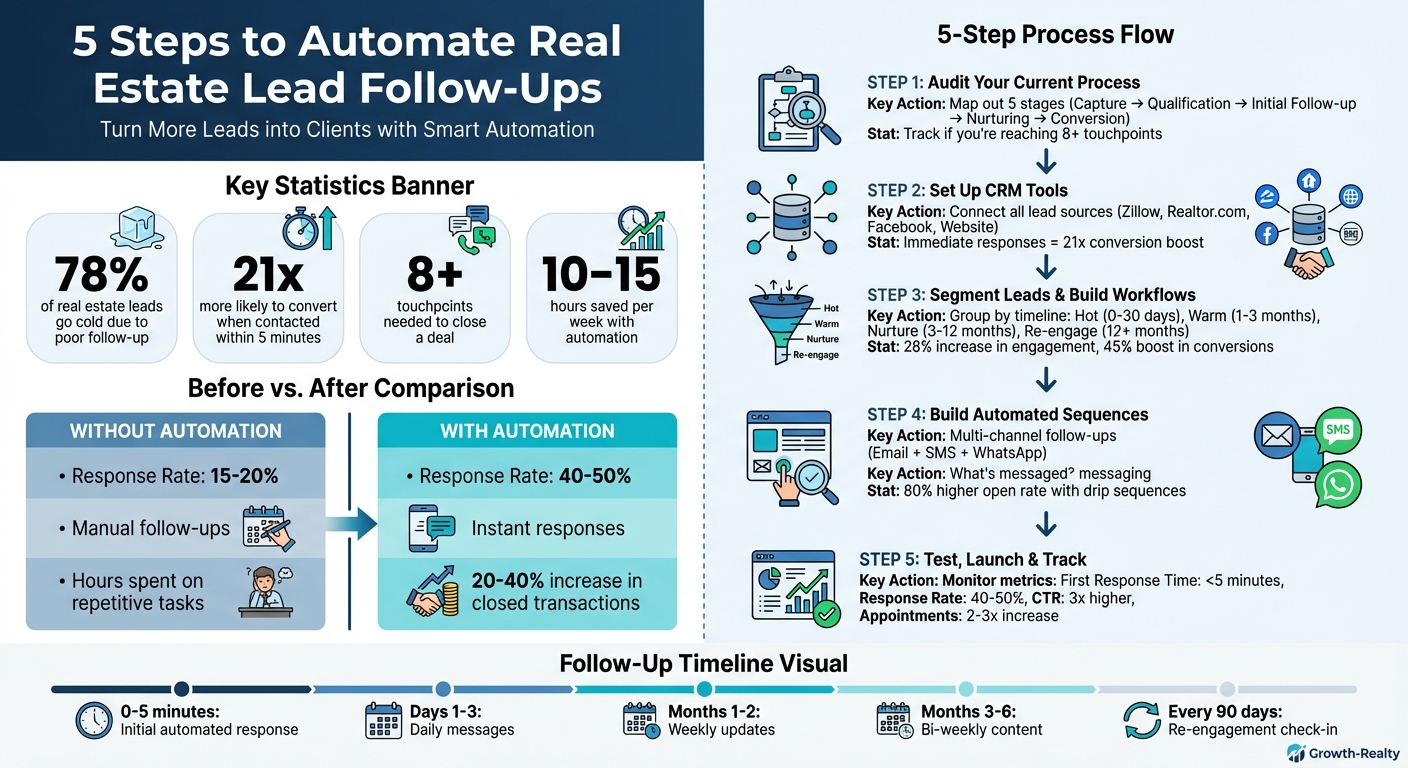
5-Step Real Estate Lead Follow-Up Automation Process with Key Statistics
Real Estate Lead Automation: Build a System
sbb-itb-2f9da9d
Step 1: Review Your Current Lead Follow-Up Process
Before diving into automation, it’s crucial to take a hard look at your current lead follow-up process. Many agents believe they have a solid system in place, but mapping out the steps often reveals gaps that could explain why leads aren’t converting as expected.
Map Out Your Manual Processes
Start by conducting a one-hour audit of your follow-up system. Write down every single step, beginning with how leads enter your system and ending with conversion. Ask yourself: How do leads get captured? Who responds first? What happens next? Break the process into these five stages: Capture, Qualification, Initial Follow-up, Nurturing, and Conversion. Be sure to note how long each stage typically takes.
A great way to spot inefficiencies is to simulate a lead submission on your website or through platforms like Zillow. This will give you a "client’s-eye view" of your process, helping you identify delays or awkward interactions you may not have noticed before.
Pay attention to the persistence gap – most leads require at least 8 touchpoints to convert. Track how many follow-ups you’re currently making. If you’re falling short, it’s time to consider automating parts of the process to ensure consistent engagement.
Once your process is fully mapped out, evaluate where your leads are coming from. This will help you identify areas where improvements can make the biggest difference.
Review Your Lead Sources
Take a closer look at where your leads originate and assess their quality. Break them into categories such as online sources (e.g., Zillow, Realtor.com, Facebook ads, your website) and offline sources (e.g., open houses, referrals, sign calls). For each source, note the average quality of the leads, how quickly you’re responding, and your conversion rates.
This analysis helps you prioritize your efforts. You’ll see which channels deserve more attention and where slow response times might be costing you valuable opportunities.
Identify Tasks to Automate
Now, pinpoint the repetitive tasks that eat up your time. The best candidates for automation are high-volume, low-complexity activities. These might include sending acknowledgment messages, delivering property details, qualifying leads with basic questions, or scheduling showings. Tasks like these are perfect for automation, freeing you up to focus on more strategic work.
Here’s a breakdown of common tasks and how automation can help:
| Task Category | Example | Automation Benefit |
|---|---|---|
| Initial Contact | Typing out "Thanks for reaching out" emails | Ensures immediate engagement and removes delays. |
| Qualification | Calling every lead to ask about budget/timeline | Filters out low-intent leads early. |
| Nurturing | Sending monthly market updates manually | Keeps leads engaged without extra effort. |
| Re-engagement | Digging through old contacts to check interest | Revives dormant leads with minimal manual work. |
Step 2: Set Up Growth-Realty CRM Tools

After identifying what tasks need automation, the next step is to implement a CRM that centralizes your leads and automates your follow-ups. Growth-Realty’s CRM is tailored specifically for real estate professionals, making it easier to gather leads from various sources and send instant follow-ups without delay.
Why is this important? It taps into the critical speed-to-lead advantage, ensuring that every lead gets an immediate response as soon as they enter your system.
Connect Your Lead Sources to the CRM
Begin by connecting all platforms where your leads originate. Growth-Realty’s CRM comes with seamless integrations for key real estate portals like Zillow, Realtor.com, and Homes.com, using built-in routing tools. For social media campaigns, you can link Facebook and Instagram Lead Ads to automatically capture inquiries and transfer them into the system.
Don’t overlook your website. Ensure that contact forms and landing pages are integrated so every submission instantly creates a contact profile. For platforms that don’t integrate natively, tools like Zapier can bridge the gap, syncing data formats and ensuring no lead is missed.
Offline sources matter too. Use digital sign-in forms at open houses that sync directly to the CRM. This way, you can trigger immediate "thank you" messages while the prospects are still engaged. Whether a lead comes from an online ad or an in-person event, they’ll receive the same prompt, professional follow-up.
Here’s an overview of how various lead sources connect to the CRM:
| Lead Source Type | Connection Method | Captured Data |
|---|---|---|
| Real Estate Portals | Direct API / Lead Routing (Zillow, Realtor.com) | Property interest, price range, phone number |
| Social Media | Lead Ad Integration (Facebook, Instagram) | Name, email, social profile, ad campaign ID |
| Company Website | Form Integration / Chatbots | Inquiry details, timeline, buyer/seller status |
| Search Engines | Landing Page Tracking (Google Ads) | Keywords, search intent, location preference |
| Offline/Manual | Mobile CRM App / Manual Entry | Referral source, meeting notes, personal details |
To ensure no lead goes unnoticed, set up a Default Lead Rule. This acts as a safety net, sending a basic welcome message to leads from sources without specific workflows. It’s a simple yet effective way to prevent missed opportunities during busy times.
Once all your sources are connected, the next step is to centralize this data for better tracking and insights.
Organize All Lead Data in One Place
With your lead sources linked, centralizing the data in one system takes your follow-ups to the next level. When everything is housed in the CRM, it tracks every interaction – website visits, property views, email opens, SMS history, and phone call recordings – in a single, unified contact profile. This comprehensive view allows you to send follow-ups that are timely and tailored to each lead’s journey.
The CRM also categorizes leads into Buyer, Seller, or Investor groups and performs automatic cleanup by merging duplicate profiles. This avoids confusion and ensures your messaging remains clear and consistent.
Another benefit is source attribution. By tracking UTM parameters and lead sources, the CRM pinpoints exactly where each lead came from, helping you evaluate the ROI of your marketing efforts. You’ll know which channels are delivering results and which ones may need adjustments.
To make scheduling effortless, sync your Google or Outlook calendar with the CRM. This allows leads to book showings directly, eliminating scheduling barriers and making it easier for them to take the next step.
"The best agents don’t see automation as a shortcut. They see it as a tool to help them focus on what really matters." – Tom Ferry, Real Estate Coach and Author
With all your data organized and accessible, you’re ready to create workflows that will automate your follow-ups effectively.
Step 3: Segment Leads and Build Workflows
Now that your CRM is up and running with all lead sources connected, it’s time to organize your leads into segments and create tailored workflows for each group. This approach ensures every lead gets follow-ups that align with their timeline and interest level, avoiding the inefficiency of a generic, one-size-fits-all strategy.
Growth-Realty’s CRM simplifies this process by tracking behavioral signals and enabling custom workflows that respond to specific actions. When done correctly, segmentation can increase engagement by 28% and boost conversions by 45%. By aligning follow-up efforts with each lead’s buying stage, you’ll create a more targeted and effective process.
Group Leads by Interest Level
Start by categorizing your leads based on their buying timeline into four key segments: Hot (0–30 days), Warm (1–3 months), Nurture (3–12 months), and Re-engage (12+ months). Each segment requires a different level of attention:
- Hot leads: These need immediate follow-ups, like daily property alerts and direct links to schedule showings.
- Warm leads: Send them similar listings and market updates 2–3 times per week to keep them engaged.
- Nurture leads: Weekly educational content, such as mortgage tips or neighborhood guides, works best for this group.
- Re-engage leads: Monthly market updates or simple check-ins are enough to keep these leads on your radar.
You can refine this further by grouping leads by buyer type – first-time buyers, move-up buyers, downsizers, investors, or those relocating. For instance, first-time buyers often need advice on financing and a clear step-by-step process, while investors are more interested in ROI data and rental market trends.
Dynamic segmentation is key. Leads should move between segments automatically based on their behavior. For example, if a "Nurture" lead repeatedly views a specific listing, they can be upgraded to "Hot". This ensures your most engaged leads get timely attention without requiring constant manual updates.
"Setting up a trigger for someone who’s visited a listing three times shows you’re paying attention without having to monitor manually." – Tom Ferry, Real Estate Coach
Set Up Workflow Triggers and Actions
Once you’ve segmented your leads, the next step is defining triggers that initiate automated follow-up actions. Triggers are specific events, like a form submission or a high-engagement behavior, that kick off a sequence of actions. Here are some common trigger examples:
- A lead submits a form on your website.
- New inquiries come in from platforms like Zillow or Realtor.com.
- A Facebook Lead Ad is completed.
- High-engagement actions, such as clicking on property links in emails, occur.
For instance, when a lead submits an inquiry via Zillow, an automated response should be sent within 5 minutes. This response could include property details, a short introduction, and a direct link to schedule a showing. Why 5 minutes? Leads contacted this quickly are 21 times more likely to convert. If there’s no reply within three days, a follow-up SMS can be triggered since text messages have a response rate 7.5 times higher than email.
Use "if-then" logic to handle high-intent actions. For example:
- If a lead views the same listing multiple times, send them a personalized message offering a private tour or suggesting similar properties.
- If a lead signals readiness, such as asking about making an offer, pause the automated sequence and take over personally.
You’ll also want to set up handoff triggers that notify you when it’s time to step in. These triggers could include leads mentioning urgency, asking about offers, or reaching a high engagement score based on their interactions. The goal is to let automation handle repetitive tasks while you focus on the moments that require a personal touch.
| Trigger Event | Automated Action |
|---|---|
| New inquiry from Zillow/Realtor.com | Auto-response with property details and booking link |
| Lead views a listing 3+ times | Automated text offering to schedule a private tour |
| Lead opens 3 consecutive emails | Move lead to "Hot" segment and notify agent for a personal call |
| Lead replies "Ready to buy" | Immediate handoff to agent and stop automated drip sequence |
Step 4: Build Automated Follow-Up Sequences
Now that you’ve set up segmented workflows, the next step is creating automated sequences to keep your leads engaged and guide them toward conversion. These sequences should combine the right communication channels, personalized messaging, and perfectly timed outreach to increase your chances of success. With Growth-Realty’s CRM, you can integrate email, SMS, and WhatsApp into a single workflow, making it easy to reach leads on their preferred platform without juggling multiple tools.
Here’s why this approach works: automated drip sequences achieve an 80% higher open rate, and nurturing emails are four times more likely to get a response. Add personalization and smart timing to the mix, and you’ve got a powerful system for turning cold leads into clients.
Use Multiple Communication Channels
To maximize your response rates, use a combination of email, SMS, and WhatsApp. Growth-Realty’s CRM makes this seamless by automatically selecting the best contact method based on the lead’s available information. For instance, if a phone number is invalid, the system will switch to email-only communication.
- Email: Perfect for detailed updates or sharing property information.
- SMS: Ideal for time-sensitive alerts or quick follow-ups, especially with hot leads.
- WhatsApp: Great for informal, real-time conversations.
For example, you can send an automated email within five minutes of capturing a lead. If there’s no response, follow up with an SMS three days later. This multi-channel approach ensures you’re reaching leads where they’re most likely to engage.
Once your channels are set, the next step is crafting messages that feel personal and relevant.
Personalize Your Follow-Up Messages
Generic messages don’t cut it. Growth-Realty’s CRM helps you personalize communication by pulling details like names, preferred neighborhoods, and property types directly from your lead records. This makes your outreach feel tailored, even though it’s automated.
- For first-time buyers, share helpful content on financing and the buying process.
- For investors, focus on data like ROI projections and rental market trends.
Adding a personal touch, like a short video introduction where you say hello and offer assistance, can go a long way in building trust and rapport. And don’t forget the power of simplicity: a quick "9-Word Email" every 90 days – like "Are you still looking to buy a home in [Neighborhood]?" – can re-engage leads who’ve gone quiet.
Once your messages are ready, timing becomes the final piece of the puzzle.
Schedule Follow-Ups at the Right Times
Timing is everything. Leads are 21 times more likely to convert if contacted within five minutes of entering your system. That’s why your first automated response should go out immediately, including property details and a link to schedule a call.
For the first three days, send one message daily to maintain momentum while the lead is actively searching. After that, shift to weekly messages for the first two months, then bi-weekly for months three through six. This schedule keeps you on their radar without overwhelming them.
Optimal send times also matter. For instance:
- Emails: Best sent between 8:00 AM and 11:00 AM for visibility or between 8:00 PM and 9:00 PM for engagement.
- Fridays at 6:00 PM: A sweet spot for high open and click rates.
- Re-engagement emails: Sunday mornings at 8:00 AM work well for cutting through the clutter.
If an email goes unanswered after three days, trigger an SMS reminder. This layered approach increases the chances of your message being seen and acted upon.
| Follow-Up Phase | Frequency | Best Send Time | Content Focus |
|---|---|---|---|
| Initial Contact | Within 5 minutes | Immediate | Welcome video, property details, scheduling link |
| Days 1-3 | Daily | 8:00 AM – 11:00 AM | Property matches, similar listings, process intro |
| Months 1-2 | Weekly | Friday at 6:00 PM | Market updates, tips, neighborhood guides |
| Months 3-6 | Bi-weekly | 8:00 PM – 9:00 PM | Educational content, success stories |
| Re-engagement | Every 90 days | Sunday at 8:00 AM | "9-Word Email" check-in |
Step 5: Test, Launch, and Track Results
Once your automated sequences are set up, the next step is to test, launch, and track their performance. This ensures everything runs smoothly, avoids errors that could affect potential leads, and helps your team work effectively alongside the automation. Using Growth-Realty’s analytics, you can fine-tune your approach for better outcomes.
Test Your Automation Workflows
Before activating your automation, put yourself in the shoes of a lead. Simulate their journey through the entire workflow to see how everything functions. Check the timing, tone, and whether personalization tags like [First Name] populate correctly.
Instead of flipping the switch on all your workflows at once, consider a soft launch. Start with a single lead source – like your Facebook leads – and keep a close eye on it for a week. Gather feedback, make adjustments, and expand only when you’re confident everything is running as it should.
Once the testing phase is complete, you’re ready to roll out and train your team.
Launch and Train Your Team
While automation takes care of repetitive tasks, your team still plays a critical role. They need to know when to step in. Train them to recognize handoff triggers – specific moments when the system signals the need for personal attention. For example, if a lead expresses readiness to buy, requests a showing, or asks about making an offer, that’s the cue for immediate follow-up.
Balance is key. Teach your team to combine automation with personal touches. Milestones like birthdays, anniversaries, or closing dates should always get a personal message, not an automated one. Encourage team members to experience the workflows themselves by setting themselves up as "leads." Additionally, schedule weekly check-ins during the first month to review what’s working and identify areas for improvement.
Once your team is confident, you can shift focus to monitoring and optimizing performance.
Monitor and Improve Performance
After launching, use Growth-Realty’s analytics dashboard to track how your automation is performing. Keep an eye on metrics like response time, open rates, click-through rates (CTR), and appointment increases. If engagement starts to dip, experiment with tweaks like adjusting subject lines or sending emails at different times. If CTRs are low, revisit your property matches or calls-to-action.
Here’s a quick look at key metrics to monitor:
| Metric | Target Benchmark | What It Tells You |
|---|---|---|
| First Response Time | Under 5 minutes | How quickly you’re engaging new leads |
| Lead Response Rate | 40–50% | Overall effectiveness of your sequences |
| Drip Sequence Open Rate | 80% higher than single emails | If your timing and subject lines resonate |
| Click-Through Rate (CTR) | 3x higher than single broadcasts | Relevance of your property alerts |
| Showing Appointments | 2–3x increase | Progression of leads down the funnel |
At first, review your data weekly to identify trends and make improvements. Once things stabilize, you can switch to monthly reviews. Even small changes – like shifting an email send time from 11:00 AM to 6:00 PM on Fridays – can significantly impact engagement. Think of your automation as a dynamic system that evolves. Regular testing, learning, and refining will keep it performing at its best.
Conclusion
Automated follow-ups can transform how you manage leads, taking them from initial contact to conversion with speed and precision. By implementing this five-step process, you’ll stay ahead in a competitive real estate market where quick responses and consistent communication often determine success. Did you know that leads contacted within 5 minutes are 21 times more likely to convert? Manual follow-ups simply can’t keep up with that level of efficiency.
By automating your follow-ups, you’ll capture opportunities that might otherwise be lost. Agents who adopt these strategies often see noticeable increases in closed transactions while freeing up time for other important tasks.
"The best agents don’t see automation as a shortcut. They see it as a tool to help them focus on what really matters." – Tom Ferry, Real Estate Coach and Author
That’s exactly what Growth-Realty’s automation tools are designed for – giving you more time to focus on showings, negotiations, and building genuine connections with clients who are ready to make a move.
The contrast between manual and automated follow-up is striking. Automation allows you to respond faster, maintain consistent communication, and convert leads more effectively. Without it, you risk losing clients to agents who are already leveraging these tools.
Ready to make the leap? Start small: connect your busiest lead source to Growth-Realty’s CRM, set up a welcome sequence, and watch your response rates climb. The sooner you embrace automation, the sooner you’ll see the results you’ve been aiming for.
FAQs
How can automating lead follow-ups boost conversion rates in real estate?
Automating lead follow-ups can significantly improve conversion rates by ensuring consistent, timely, and tailored communication with potential clients. In real estate, many leads need multiple interactions – sometimes 8 or more – before they’re ready to make a decision. Automation ensures every touchpoint is covered, so no opportunities fall through the cracks.
With automated systems handling follow-ups, you can keep leads engaged, build stronger connections, and avoid losing up to 78% of potential clients who might otherwise be overlooked. This frees up agents to concentrate on closing deals, all while maintaining a professional and responsive image with every prospect.
What are the main advantages of using a CRM for managing real estate leads?
A real estate CRM makes managing leads much easier by bringing all client details – like calls, emails, texts, and website activity – into a single, searchable database. This consolidated view helps agents organize leads based on factors like budget, preferences, or how ready they are to make a purchase. With this setup, agents can create more personalized follow-ups and communication. Plus, automation tools ensure quick responses, such as SMS replies, which boast an impressive 97% open rate, allowing agents to connect with leads swiftly and effectively.
In addition to speeding up response times, a CRM takes care of repetitive tasks like sending drip email campaigns, scheduling follow-up calls, and setting reminders. This gives agents more time to focus on crucial activities like property showings and negotiations. Advanced tools, such as Growth-Realty’s AI-powered CRM, go a step further by offering features like built-in analytics, automated workflows, and WhatsApp chatbots. These tools make it easier to nurture leads and close deals more efficiently.
How can I organize my real estate leads to improve follow-ups?
To keep your real estate leads organized, start by sorting them into groups based on factors like buyer type (buyer, seller, or investor), timeline (ready to act now, 3–6 months, or 12+ months), budget, preferred property type (single-family home, condo, or multifamily property), or lead source (website, social media, referrals, etc.). This kind of segmentation gives you a clear picture of their needs, making it easier to personalize your approach.
An AI-powered CRM can make this process much easier. Take Growth-Realty’s CRM, for example – it automatically tags and scores leads by tracking their activity, such as email opens or clicks on property listings. From there, it can send out tailored follow-ups, like instant property recommendations for hot leads or re-engagement emails for those who’ve gone quiet. This way, every lead gets the right message at the right time, saving you effort while increasing your chances of converting them.

